 hailin
cb54502fae
hailin
cb54502fae
|
||
|---|---|---|
| .. | ||
| data | ||
| data_pipeline | ||
| imgs | ||
| main | ||
| src | ||
| README.md | ||
README.md
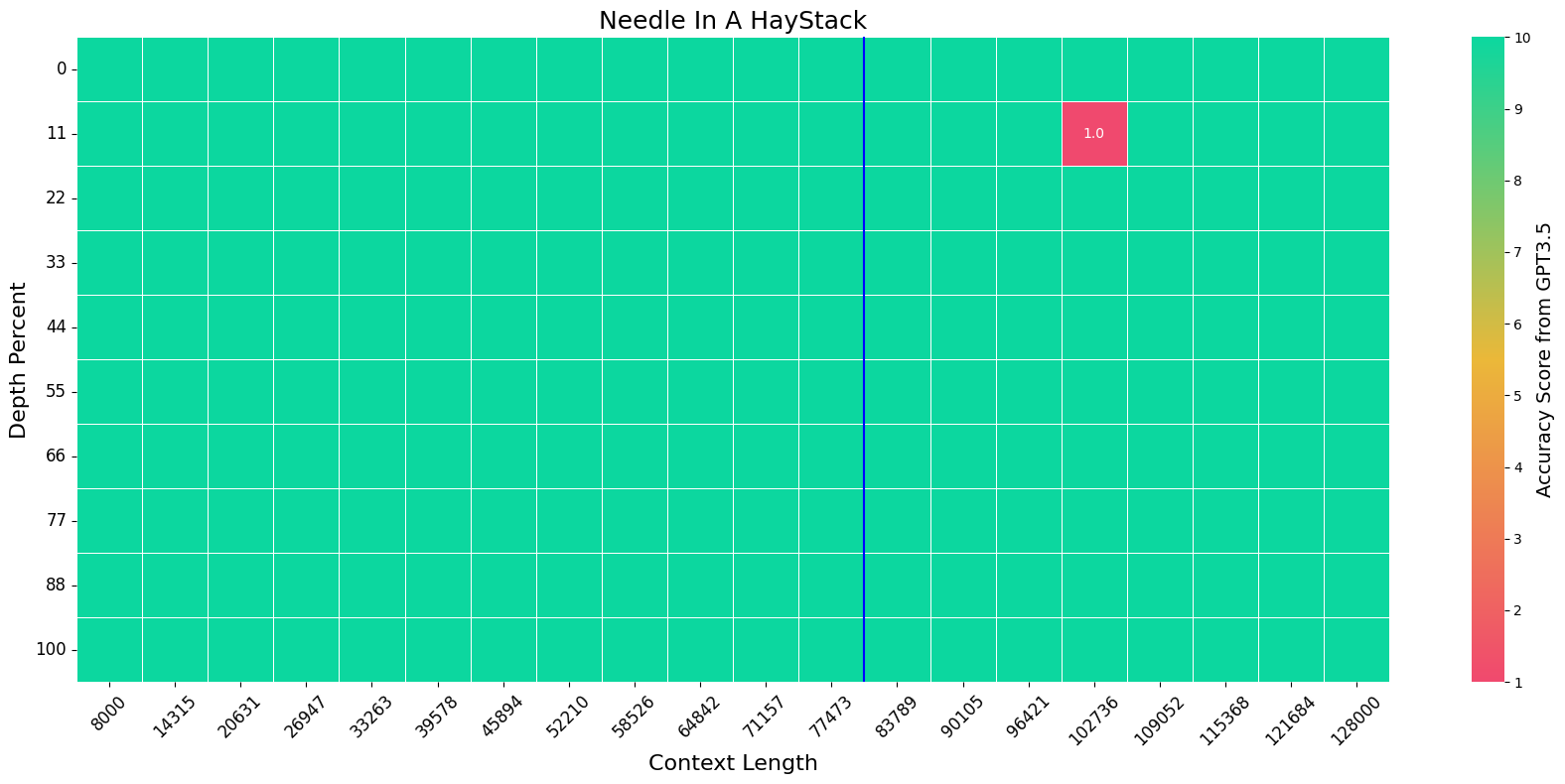
We extend the context length of Llama-3-8B-Instruct from 8K to 80K via QLoRA fine-tuning. The entire training cycle is super efficient, which takes 8 hours on one 8xA800 (80G) GPU machine. The resulted model exhibits superior performances across a broad range of evaluation tasks, such as NIHS, topic retrieval, and long-context language understanding; meanwhile, it also preserves the original capability over short contexts. The dramatic context extension is mainly attributed to merely 3.5K synthetic data generated by GPT-4, which indicates the LLMs' inherent (yet largely underestimated) potential to extend its original context length. In fact, the context length could be extended far beyond 80K with more computing resources.
Environment
conda create -n unsloth python=3.10
conda activate unsloth

conda install pytorch==2.2.2 pytorch-cuda=12.1 cudatoolkit xformers -c pytorch -c nvidia -c xformers
pip install transformers==4.39.3 deepspeed accelerate datasets==2.18.0 peft bitsandbytes
pip install flash-attn --no-build-isolation
pip install "unsloth[colab-new] @ git+https://github.com/unslothai/unsloth.git"

# these packages are used in evaluation
pip install rouge fuzzywuzzy jieba pandas seaborn python-Levenshtein
NOTE: you must modify the source code of unsloth so that you can set the rope_theta correctly in training. Go to $ENC_LOCATION$/lib/python3.10/site-packages/unsloth/models/llama.py, comment all lines from 1080-1088. The results should be like:
# if (rope_scaling is None) and (max_seq_length > model_max_seq_length):
#     rope_scaling = max_seq_length / model_max_seq_length
#     logger.warning_once(
#         f"Unsloth: {model_name} can only handle sequence lengths of at most "\
#         f"{model_max_seq_length}.\nBut with kaiokendev's RoPE scaling of "\
#         f"{round(rope_scaling, 3)}, it can be magically be extended to "\
#         f"{max_seq_length}!"
#     )
#     rope_scaling = {"type": "linear", "factor": rope_scaling,}
Full-attention models cannot run with more than 60K context length on a single A800 GPU. Parallel strategies are required. We use tensor_parallel. However, tensor_parallel does not support transformers>=4.36. You should create another environment while downgrade to transformers==4.35.1 and install tensor_parallel:
conda create -n full --clone unsloth
conda activate full

pip install transformers==4.35.1 datasets==2.14.5 tensor_parallel
Data
You should download the data for fine-tuning & evaluation then untar the file at anywhere you prefer, e.g. /data, which results in a folder /data/long-llm:
# feel free to alternate /data to your prefered location
wget https://huggingface.co/datasets/namespace-Pt/projects/resolve/main/long-llm.tar.gz?download=true -O /data/long-llm.tar.gz

cd /data
tar -xzvf long-llm.tar.gz
IMPORTANT NOTE
For any path specified for train_data and eval_data: if it is prefixed with long-llm:, it will be solved to the relative path against data_root.
- for example,
long-llm:redpajama/train.json->${data_root}/redpajama/train.json - you can modify the default value of
data_root, so that you don't need to type it for each command.
Training
NOTE: unsloth does not support DDP training now despite they used to in May 2024. So the training script won't work. You're encouraged to open a feature request in the unsloth repo. Or, you can try to use some other framework for efficient tuning, like MegatronLM. More details can be found in this issue.
export PYTORCH_CUDA_ALLOC_CONF=expandable_segments:True

output_name=qlora-llama3_chat-gpt_longalpaca_redpajama5000-unsloth

torchrun --nproc_per_node 8 -m main.train \
--data_root /data/long-llm \
--output_dir data/outputs/$output_name \
--model_name_or_path meta-llama/Meta-Llama-3-8B-Instruct \
--train_data long-llm:gpt/one_detail_book.train.64K.json long-llm:gpt/one_detail_paper.train.64K.json long-llm:gpt/multi_detail_book.train.json long-llm:gpt/multi_detail_paper_short.train.json long-llm:gpt/multi_detail_paper_long.train.json long-llm:gpt/bio_book.train.json long-llm:longalpaca/train.json long-llm:redpajama/train.json[5000] \
--max_length 81920 \
--group_by_length \
--rope_theta 200e6 \
--attn_impl flash_attention_2 \
--gradient_checkpointing \
--use_reentrant True \
--learning_rate 5e-5 \
--num_train_epochs 1 \
--save_only_model \
--save_strategy epoch \
--logging_steps 5 \
--bf16 \
--lora_tune \
--lora_extra_params embed_tokens \
--load_in_4_bit \
--chat_template llama-3
Note that unsloth will automatically download their quantized version of Llama-3-8B-Insturct in the first training run. No warry. Just download it.
Evaluation
All evaluation results will be saved at data/results/.
LoRA Model
export PYTORCH_CUDA_ALLOC_CONF=expandable_segments:True

# base model id
model=meta-llama/Meta-Llama-3-8B-Instruct
# lora model id
lora=namespace-Pt/Llama-3-8B-Instruct-80K-QLoRA

COMMAND="--data_root /data/long-llm --model_name_or_path $model --lora $lora --rope_theta 200e6 --attn_impl flash_attention_2 --chat_template llama-3"

source /opt/conda/bin/activate unsloth

torchrun --nproc_per_node 8 -m main.eval_longbench --max_length 31500 $COMMAND
torchrun --nproc_per_node 8 -m main.eval_topic $COMMAND
torchrun --nproc_per_node 8 -m main.eval_mmlu $COMMAND

source /opt/conda/bin/activate full

python -m main.eval_needle $COMMAND --min_length 8000 --max_length 80000 --enable_tp
python -m main.eval_infbench $COMMAND --max_length 80000 --enable_tp

# you can use GPT3.5 as the scorer with the following command:
# export OPENAI_API_KEY="sk-xxxx"
# python -m main.eval_needle $COMMAND --min_length 8000 --max_length 80000 --enable_tp --gpt_eval
Full Model
export PYTORCH_CUDA_ALLOC_CONF=expandable_segments:True

# model id
model=gradientai/Llama-3-8B-Instruct-262k

COMMAND="--data_root /data/long-llm --model_name_or_path $model --chat_template llama-3 --attn_impl flash_attention_2"

source /opt/conda/bin/activate unsloth

torchrun --nproc_per_node 8 -m main.eval_longbench --max_length 31500 $COMMAND
torchrun --nproc_per_node 8 -m main.eval_topic $COMMAND
torchrun --nproc_per_node 8 -m main.eval_mmlu $COMMAND

source /opt/conda/bin/activate full

python -m main.eval_needle $COMMAND --min_length 8000 --max_length 80000 --enable_tp
python -m main.eval_infbench $COMMAND --max_length 80000 --enable_tp

# you can use GPT3.5 as the scorer with the following command:
# export OPENAI_API_KEY="sk-xxxx"
# python -m main.eval_needle $COMMAND --min_length 8000 --max_length 80000 --enable_tp --gpt_eval
Usage
You can load the model in two ways. Either loading the LoRA adapter then merge the LoRA adapter onto Llama-3-8B-Instruct, or directly load the merged model.
LoRA Model
import json
import torch
from transformers import AutoModelForCausalLM, AutoTokenizer
from peft import PeftModel

model_id = "meta-llama/Meta-Llama-3-8B-Instruct"
peft_id = "namespace-Pt/Llama-3-8B-Instruct-80K-QLoRA"

torch_dtype = torch.bfloat16
# place the model on GPU
device_map = {"": "cuda"}

tokenizer = AutoTokenizer.from_pretrained(model_id)

base_model = AutoModelForCausalLM.from_pretrained(
  model_id,
  torch_dtype=torch.bfloat16,
  device_map=device_map,
  attn_implementation="flash_attention_2",

  # NOTE: expand rope base
  rope_theta=200e6,
)

model = PeftModel.from_pretrained(
    base_model,
    peft_id,
    torch_dtype=torch.bfloat16,
    device_map=device_map,
)
# NOTE: merge LoRA weights
model = model.merge_and_unload().eval()

with torch.no_grad():
  # short context
  messages = [{"role": "user", "content": "Tell me about yourself."}]
  inputs = tokenizer.apply_chat_template(messages, tokenize=True, add_generation_prompt=True, return_tensors="pt", return_dict=True).to("cuda")
  outputs = model.generate(**inputs, max_new_tokens=50)[:, inputs["input_ids"].shape[1]:]
  print(f"Input Length: {inputs['input_ids'].shape[1]}")
  print(f"Output:       {tokenizer.decode(outputs[0])}")

  # long context
  with open("data/narrativeqa.json", encoding="utf-8") as f:
    example = json.load(f)
  messages = [{"role": "user", "content": example["context"]}]
  inputs = tokenizer.apply_chat_template(messages, tokenize=True, add_generation_prompt=True, return_tensors="pt", return_dict=True).to("cuda")
  outputs = model.generate(**inputs, do_sample=False, top_p=1, temperature=1, max_new_tokens=20)[:, inputs["input_ids"].shape[1]:]
  print("*"*20)
  print(f"Input Length: {inputs['input_ids'].shape[1]}")
  print(f"Answers:      {example['answer']}")
  print(f"Prediction:   {tokenizer.decode(outputs[0])}")
You may observe messages like:
This is a friendly reminder - the current text generation call will exceed the model's predefined maximum length (8192). Depending on the model, you may observe exceptions, performance degradation, or nothing at all. or Setting pad_token_id to eos_token_id:128001 for open-end generation. They do not matter. Just ignore them.
Full Model
import json
import torch
from transformers import AutoModelForCausalLM, AutoTokenizer

model_id = "namespace-Pt/Llama-3-8B-Instruct-80K-QLoRA-Merged"

torch_dtype = torch.bfloat16
# place the model on GPU
device_map = {"": "cuda"}

tokenizer = AutoTokenizer.from_pretrained(model_id)

model = AutoModelForCausalLM.from_pretrained(
  model_id,
  torch_dtype=torch.bfloat16,
  device_map=device_map,
  attn_implementation="flash_attention_2",
).eval()

with torch.no_grad():
  # short context
  messages = [{"role": "user", "content": "Tell me about yourself."}]
  inputs = tokenizer.apply_chat_template(messages, tokenize=True, add_generation_prompt=True, return_tensors="pt", return_dict=True).to("cuda")
  outputs = model.generate(**inputs, max_new_tokens=50)[:, inputs["input_ids"].shape[1]:]
  print(f"Input Length: {inputs['input_ids'].shape[1]}")
  print(f"Output:       {tokenizer.decode(outputs[0])}")

  # long context
  with open("data/narrativeqa.json", encoding="utf-8") as f:
    example = json.load(f)
  messages = [{"role": "user", "content": example["context"]}]
  inputs = tokenizer.apply_chat_template(messages, tokenize=True, add_generation_prompt=True, return_tensors="pt", return_dict=True).to("cuda")
  outputs = model.generate(**inputs, do_sample=False, top_p=1, temperature=1, max_new_tokens=20)[:, inputs["input_ids"].shape[1]:]
  print("*"*20)
  print(f"Input Length: {inputs['input_ids'].shape[1]}")
  print(f"Answers:      {example['answer']}")
  print(f"Prediction:   {tokenizer.decode(outputs[0])}")
You may observe messages like:
This is a friendly reminder - the current text generation call will exceed the model's predefined maximum length (8192). Depending on the model, you may observe exceptions, performance degradation, or nothing at all. or Setting pad_token_id to eos_token_id:128001 for open-end generation. They do not matter. Just ignore them.
TODO
- release training data
- release data generation pipeline
Citation
If you find this repository useful, please give us a star ⭐.
To cite our work:
@misc{zhang2024extending,
      title={Extending Llama-3's Context Ten-Fold Overnight},
      author={Peitian Zhang and Ninglu Shao and Zheng Liu and Shitao Xiao and Hongjin Qian and Qiwei Ye and Zhicheng Dou},
      year={2024},
      eprint={2404.19553},
      archivePrefix={arXiv},
      primaryClass={cs.CL}
}