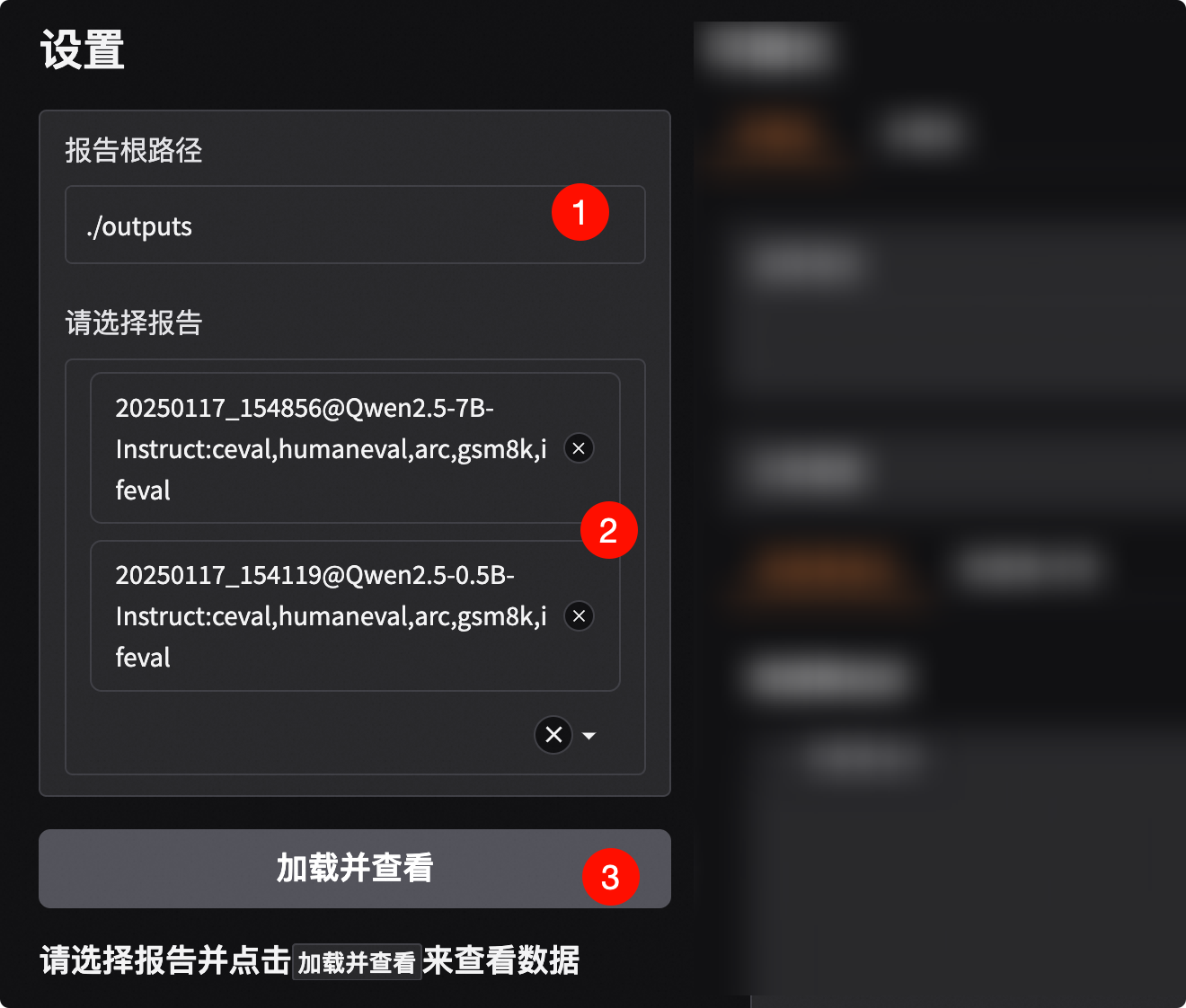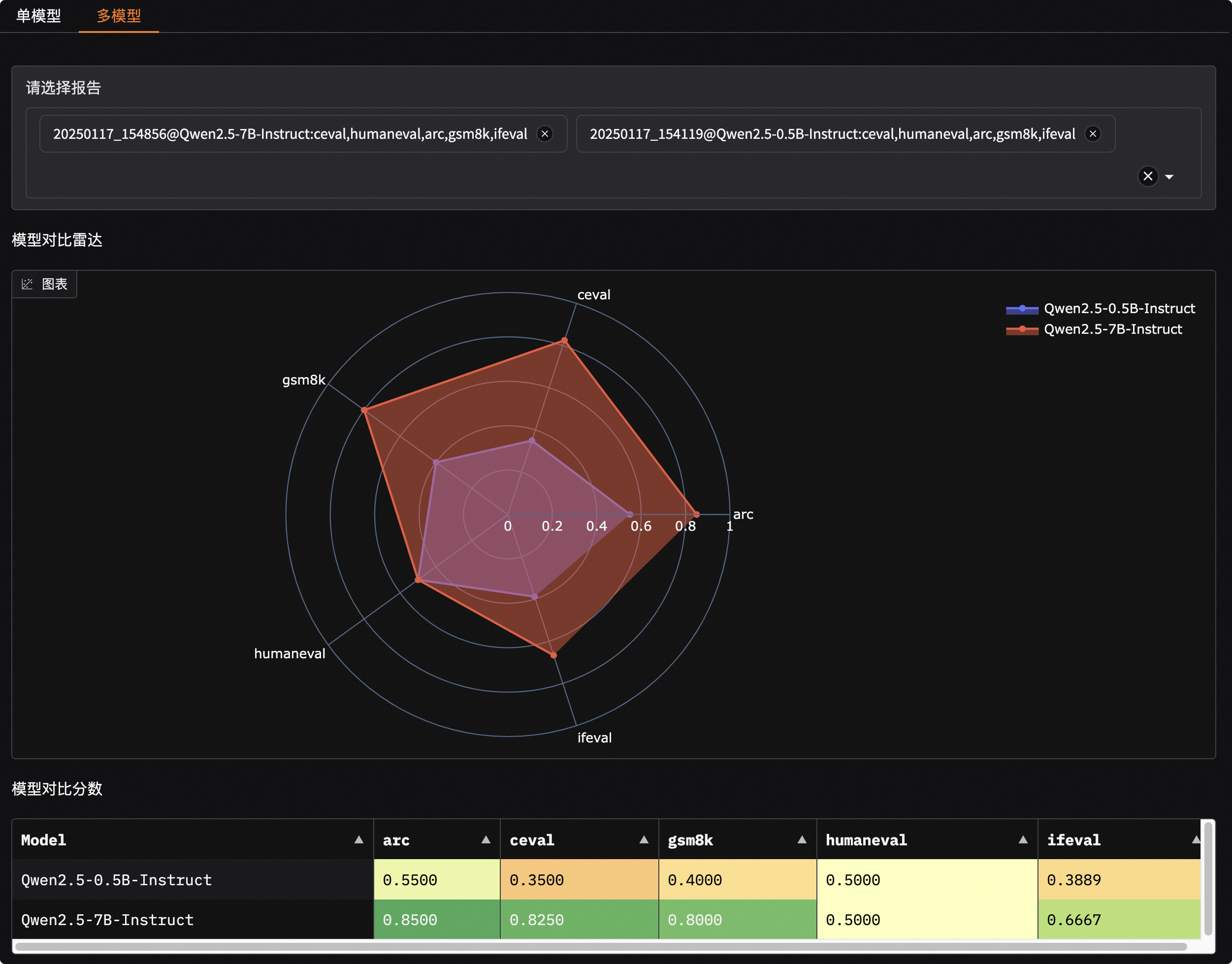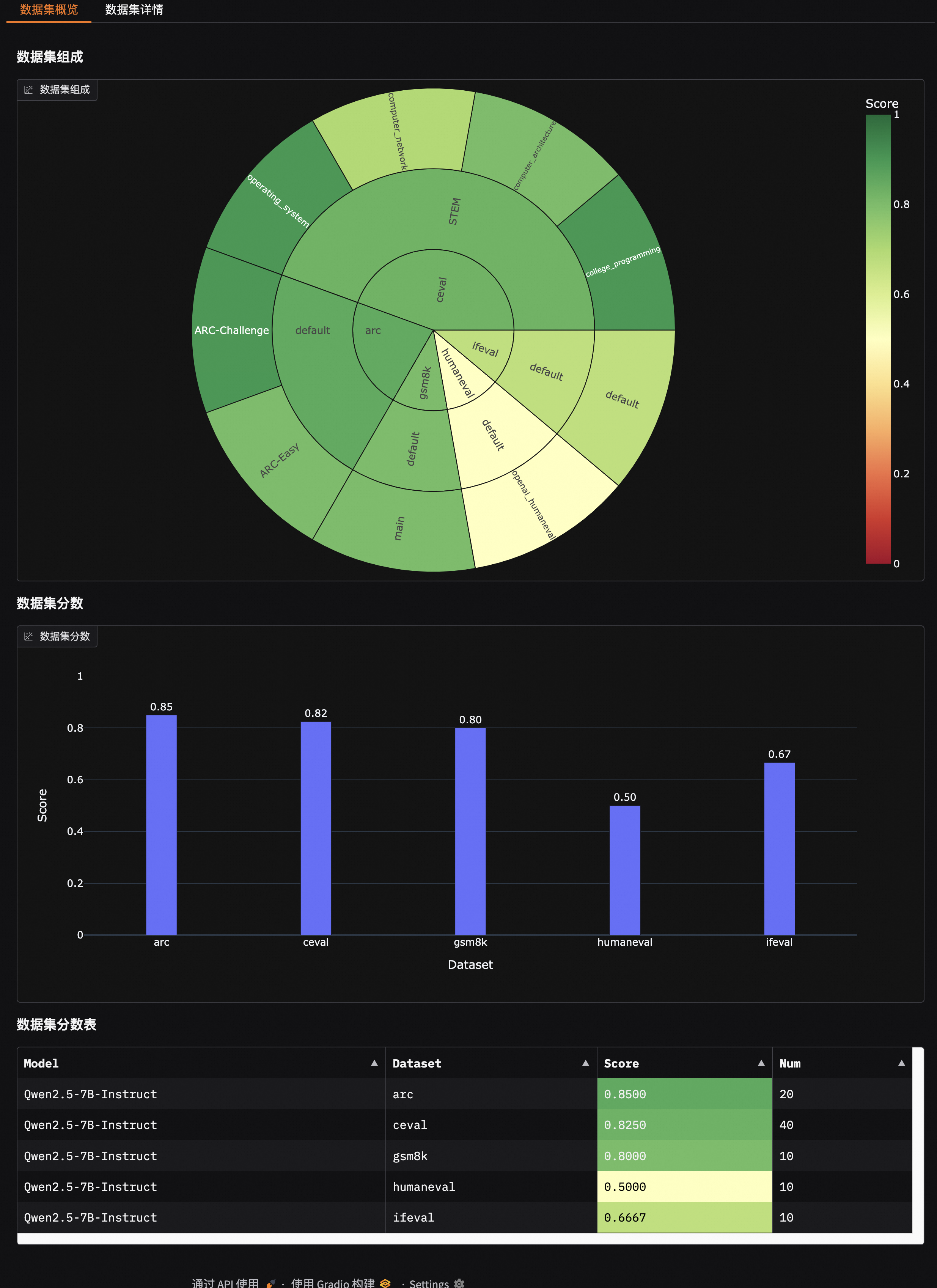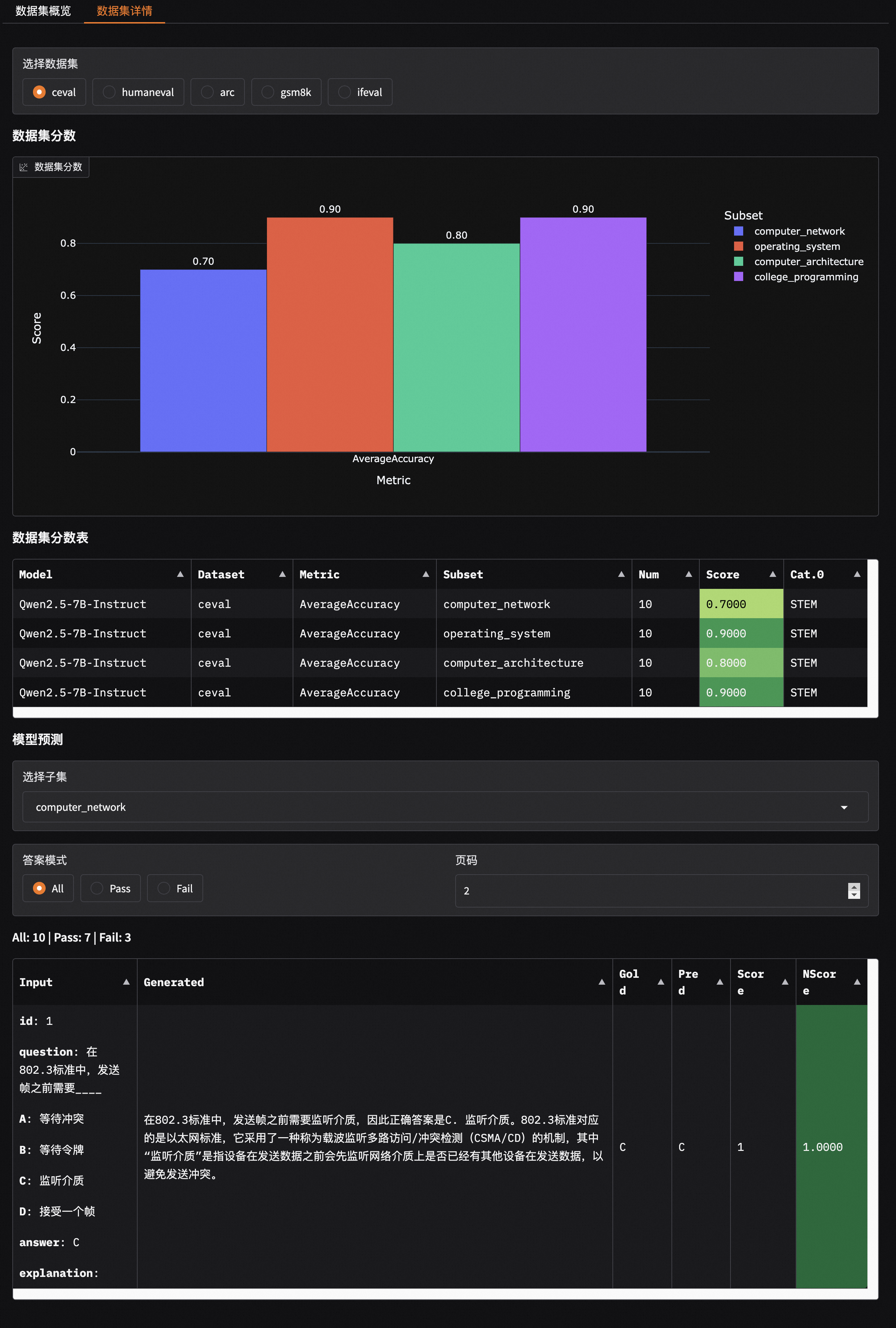
中文 | English





📖 中文文档 | 📖 English Documents
> ⭐ 如果你喜欢这个项目,请点击右上角的 "Star" 按钮支持我们。你的支持是我们前进的动力!
## 📋 目录
- [简介](#-简介)
- [新闻](#-新闻)
- [环境准备](#️-环境准备)
- [快速开始](#-快速开始)
- [其他评测后端](#-其他评测后端)
- [自定义数据集评测](#-自定义数据集评测)
- [竞技场模式](#-竞技场模式)
- [性能评测工具](#-推理性能评测工具)
- [贡献](#️-贡献)
## 📝 简介
EvalScope 是[魔搭社区](https://modelscope.cn/)倾力打造的模型评测与性能基准测试框架,为您的模型评估需求提供一站式解决方案。无论您在开发什么类型的模型,EvalScope 都能满足您的需求:
- 🧠 大语言模型
- 🎨 多模态模型
- 🔍 Embedding 模型
- 🏆 Reranker 模型
- 🖼️ CLIP 模型
- 🎭 AIGC模型(图生文/视频)
- ...以及更多!
EvalScope 不仅仅是一个评测工具,它是您模型优化之旅的得力助手:
- 🏅 内置多个业界认可的测试基准和评测指标:MMLU、CMMLU、C-Eval、GSM8K 等。
- 📊 模型推理性能压测:确保您的模型在实际应用中表现出色。
- 🚀 与 [ms-swift](https://github.com/modelscope/ms-swift) 训练框架无缝集成,一键发起评测,为您的模型开发提供从训练到评估的全链路支持。
下面是 EvalScope 的整体架构图:
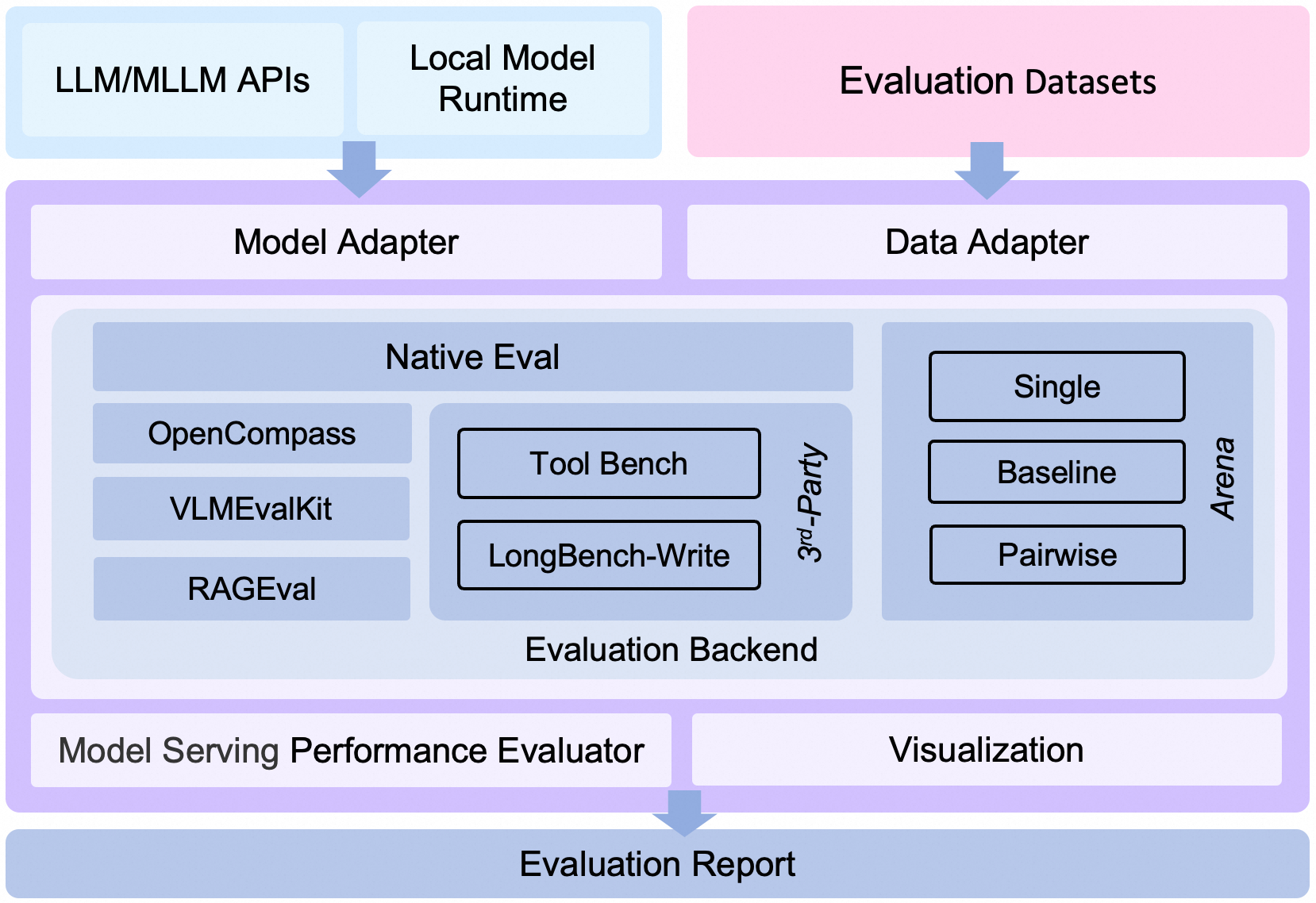
EvalScope 整体架构图.
架构介绍
1. **Model Adapter**: 模型适配器,用于将特定模型的输出转换为框架所需的格式,支持API调用的模型和本地运行的模型。
2. **Data Adapter**: 数据适配器,负责转换和处理输入数据,以便适应不同的评测需求和格式。
3. **Evaluation Backend**:
- **Native**:EvalScope自身的**默认评测框架**,支持多种评测模式,包括单模型评测、竞技场模式、Baseline模型对比模式等。
- **OpenCompass**:支持[OpenCompass](https://github.com/open-compass/opencompass)作为评测后端,对其进行了高级封装和任务简化,您可以更轻松地提交任务进行评测。
- **VLMEvalKit**:支持[VLMEvalKit](https://github.com/open-compass/VLMEvalKit)作为评测后端,轻松发起多模态评测任务,支持多种多模态模型和数据集。
- **RAGEval**:支持RAG评测,支持使用[MTEB/CMTEB](https://evalscope.readthedocs.io/zh-cn/latest/user_guides/backend/rageval_backend/mteb.html)进行embedding模型和reranker的独立评测,以及使用[RAGAS](https://evalscope.readthedocs.io/zh-cn/latest/user_guides/backend/rageval_backend/ragas.html)进行端到端评测。
- **ThirdParty**:其他第三方评测任务,如ToolBench。
4. **Performance Evaluator**: 模型性能评测,负责具体衡量模型推理服务性能,包括性能评测、压力测试、性能评测报告生成、可视化。
5. **Evaluation Report**: 最终生成的评测报告,总结模型的性能表现,报告可以用于决策和进一步的模型优化。
6. **Visualization**: 可视化结果,帮助用户更直观地理解评测结果,便于分析和比较不同模型的表现。
 |
|  |
|  ## 🎉 新闻
- 🔥 **[2025.05.16]** 模型服务性能压测支持设置多种并发,并输出性能压测报告,[参考示例](https://evalscope.readthedocs.io/zh-cn/latest/user_guides/stress_test/quick_start.html#id3)。
- 🔥 **[2025.05.13]** 新增支持[ToolBench-Static](https://modelscope.cn/datasets/AI-ModelScope/ToolBench-Static)数据集,评测模型的工具调用能力,参考[使用文档](https://evalscope.readthedocs.io/zh-cn/latest/third_party/toolbench.html);支持[DROP](https://modelscope.cn/datasets/AI-ModelScope/DROP/dataPeview)和[Winogrande](https://modelscope.cn/datasets/AI-ModelScope/winogrande_val)评测基准,评测模型的推理能力。
- 🔥 **[2025.04.29]** 新增Qwen3评测最佳实践,[欢迎阅读📖](https://evalscope.readthedocs.io/zh-cn/latest/best_practice/qwen3.html)
- 🔥 **[2025.04.27]** 支持文生图评测:支持MPS、HPSv2.1Score等8个指标,支持EvalMuse、GenAI-Bench等评测基准,参考[使用文档](https://evalscope.readthedocs.io/zh-cn/latest/user_guides/aigc/t2i.html)
- 🔥 **[2025.04.10]** 模型服务压测工具支持`/v1/completions`端点(也是vLLM基准测试的默认端点)
- 🔥 **[2025.04.08]** 支持OpenAI API兼容的Embedding模型服务评测,查看[使用文档](https://evalscope.readthedocs.io/zh-cn/latest/user_guides/backend/rageval_backend/mteb.html#configure-evaluation-parameters)
- 🔥 **[2025.03.27]** 新增支持[AlpacaEval](https://www.modelscope.cn/datasets/AI-ModelScope/alpaca_eval/dataPeview)和[ArenaHard](https://modelscope.cn/datasets/AI-ModelScope/arena-hard-auto-v0.1/summary)评测基准,使用注意事项请查看[文档](https://evalscope.readthedocs.io/zh-cn/latest/get_started/supported_dataset.html)
- 🔥 **[2025.03.20]** 模型推理服务压测支持random生成指定范围长度的prompt,参考[使用指南](https://evalscope.readthedocs.io/zh-cn/latest/user_guides/stress_test/examples.html#random)
- 🔥 **[2025.03.13]** 新增支持[LiveCodeBench](https://www.modelscope.cn/datasets/AI-ModelScope/code_generation_lite/summary)代码评测基准,指定`live_code_bench`即可使用;支持QwQ-32B 在LiveCodeBench上评测,参考[最佳实践](https://evalscope.readthedocs.io/zh-cn/latest/best_practice/eval_qwq.html)。
- 🔥 **[2025.03.11]** 新增支持[SimpleQA](https://modelscope.cn/datasets/AI-ModelScope/SimpleQA/summary)和[Chinese SimpleQA](https://modelscope.cn/datasets/AI-ModelScope/Chinese-SimpleQA/summary)评测基准,用与评测模型的事实正确性,指定`simple_qa`和`chinese_simpleqa`使用。同时支持指定裁判模型,参考[相关参数说明](https://evalscope.readthedocs.io/zh-cn/latest/get_started/parameters.html)。
- 🔥 **[2025.03.07]** 新增QwQ-32B模型评测最佳实践,评测了模型的推理能力以及推理效率,参考[📖QwQ-32B模型评测最佳实践](https://evalscope.readthedocs.io/zh-cn/latest/best_practice/eval_qwq.html)。
- 🔥 **[2025.03.04]** 新增支持[SuperGPQA](https://modelscope.cn/datasets/m-a-p/SuperGPQA/summary)数据集,其覆盖 13 个门类、72 个一级学科和 285 个二级学科,共 26,529 个问题,指定`super_gpqa`即可使用。
- 🔥 **[2025.03.03]** 新增支持评测模型的智商和情商,参考[📖智商和情商评测最佳实践](https://evalscope.readthedocs.io/zh-cn/latest/best_practice/iquiz.html),来测测你家的AI有多聪明?
- 🔥 **[2025.02.27]** 新增支持评测推理模型的思考效率,参考[📖思考效率评测最佳实践](https://evalscope.readthedocs.io/zh-cn/latest/best_practice/think_eval.html),该实现参考了[Overthinking](https://doi.org/10.48550/arXiv.2412.21187) 和 [Underthinking](https://doi.org/10.48550/arXiv.2501.18585)两篇工作。
- 🔥 **[2025.02.25]** 新增支持[MuSR](https://modelscope.cn/datasets/AI-ModelScope/MuSR)和[ProcessBench](https://www.modelscope.cn/datasets/Qwen/ProcessBench/summary)两个模型推理相关评测基准,datasets分别指定`musr`和`process_bench`即可使用。
- 🔥 **[2025.02.18]** 支持AIME25数据集,包含15道题目(Grok3 在该数据集上得分为93分)
- 🔥 **[2025.02.13]** 支持DeepSeek蒸馏模型评测,包括AIME24, MATH-500, GPQA-Diamond数据集,参考[最佳实践](https://evalscope.readthedocs.io/zh-cn/latest/best_practice/deepseek_r1_distill.html);支持指定`eval_batch_size`参数,加速模型评测
- 🔥 **[2025.01.20]** 支持可视化评测结果,包括单模型评测结果和多模型评测结果对比,参考[📖可视化评测结果](https://evalscope.readthedocs.io/zh-cn/latest/get_started/visualization.html);新增[`iquiz`](https://modelscope.cn/datasets/AI-ModelScope/IQuiz/summary)评测样例,评测模型的IQ和EQ。
- 🔥 **[2025.01.07]** Native backend: 支持模型API评测,参考[📖模型API评测指南](https://evalscope.readthedocs.io/zh-cn/latest/get_started/basic_usage.html#api);新增支持`ifeval`评测基准。
## 🎉 新闻
- 🔥 **[2025.05.16]** 模型服务性能压测支持设置多种并发,并输出性能压测报告,[参考示例](https://evalscope.readthedocs.io/zh-cn/latest/user_guides/stress_test/quick_start.html#id3)。
- 🔥 **[2025.05.13]** 新增支持[ToolBench-Static](https://modelscope.cn/datasets/AI-ModelScope/ToolBench-Static)数据集,评测模型的工具调用能力,参考[使用文档](https://evalscope.readthedocs.io/zh-cn/latest/third_party/toolbench.html);支持[DROP](https://modelscope.cn/datasets/AI-ModelScope/DROP/dataPeview)和[Winogrande](https://modelscope.cn/datasets/AI-ModelScope/winogrande_val)评测基准,评测模型的推理能力。
- 🔥 **[2025.04.29]** 新增Qwen3评测最佳实践,[欢迎阅读📖](https://evalscope.readthedocs.io/zh-cn/latest/best_practice/qwen3.html)
- 🔥 **[2025.04.27]** 支持文生图评测:支持MPS、HPSv2.1Score等8个指标,支持EvalMuse、GenAI-Bench等评测基准,参考[使用文档](https://evalscope.readthedocs.io/zh-cn/latest/user_guides/aigc/t2i.html)
- 🔥 **[2025.04.10]** 模型服务压测工具支持`/v1/completions`端点(也是vLLM基准测试的默认端点)
- 🔥 **[2025.04.08]** 支持OpenAI API兼容的Embedding模型服务评测,查看[使用文档](https://evalscope.readthedocs.io/zh-cn/latest/user_guides/backend/rageval_backend/mteb.html#configure-evaluation-parameters)
- 🔥 **[2025.03.27]** 新增支持[AlpacaEval](https://www.modelscope.cn/datasets/AI-ModelScope/alpaca_eval/dataPeview)和[ArenaHard](https://modelscope.cn/datasets/AI-ModelScope/arena-hard-auto-v0.1/summary)评测基准,使用注意事项请查看[文档](https://evalscope.readthedocs.io/zh-cn/latest/get_started/supported_dataset.html)
- 🔥 **[2025.03.20]** 模型推理服务压测支持random生成指定范围长度的prompt,参考[使用指南](https://evalscope.readthedocs.io/zh-cn/latest/user_guides/stress_test/examples.html#random)
- 🔥 **[2025.03.13]** 新增支持[LiveCodeBench](https://www.modelscope.cn/datasets/AI-ModelScope/code_generation_lite/summary)代码评测基准,指定`live_code_bench`即可使用;支持QwQ-32B 在LiveCodeBench上评测,参考[最佳实践](https://evalscope.readthedocs.io/zh-cn/latest/best_practice/eval_qwq.html)。
- 🔥 **[2025.03.11]** 新增支持[SimpleQA](https://modelscope.cn/datasets/AI-ModelScope/SimpleQA/summary)和[Chinese SimpleQA](https://modelscope.cn/datasets/AI-ModelScope/Chinese-SimpleQA/summary)评测基准,用与评测模型的事实正确性,指定`simple_qa`和`chinese_simpleqa`使用。同时支持指定裁判模型,参考[相关参数说明](https://evalscope.readthedocs.io/zh-cn/latest/get_started/parameters.html)。
- 🔥 **[2025.03.07]** 新增QwQ-32B模型评测最佳实践,评测了模型的推理能力以及推理效率,参考[📖QwQ-32B模型评测最佳实践](https://evalscope.readthedocs.io/zh-cn/latest/best_practice/eval_qwq.html)。
- 🔥 **[2025.03.04]** 新增支持[SuperGPQA](https://modelscope.cn/datasets/m-a-p/SuperGPQA/summary)数据集,其覆盖 13 个门类、72 个一级学科和 285 个二级学科,共 26,529 个问题,指定`super_gpqa`即可使用。
- 🔥 **[2025.03.03]** 新增支持评测模型的智商和情商,参考[📖智商和情商评测最佳实践](https://evalscope.readthedocs.io/zh-cn/latest/best_practice/iquiz.html),来测测你家的AI有多聪明?
- 🔥 **[2025.02.27]** 新增支持评测推理模型的思考效率,参考[📖思考效率评测最佳实践](https://evalscope.readthedocs.io/zh-cn/latest/best_practice/think_eval.html),该实现参考了[Overthinking](https://doi.org/10.48550/arXiv.2412.21187) 和 [Underthinking](https://doi.org/10.48550/arXiv.2501.18585)两篇工作。
- 🔥 **[2025.02.25]** 新增支持[MuSR](https://modelscope.cn/datasets/AI-ModelScope/MuSR)和[ProcessBench](https://www.modelscope.cn/datasets/Qwen/ProcessBench/summary)两个模型推理相关评测基准,datasets分别指定`musr`和`process_bench`即可使用。
- 🔥 **[2025.02.18]** 支持AIME25数据集,包含15道题目(Grok3 在该数据集上得分为93分)
- 🔥 **[2025.02.13]** 支持DeepSeek蒸馏模型评测,包括AIME24, MATH-500, GPQA-Diamond数据集,参考[最佳实践](https://evalscope.readthedocs.io/zh-cn/latest/best_practice/deepseek_r1_distill.html);支持指定`eval_batch_size`参数,加速模型评测
- 🔥 **[2025.01.20]** 支持可视化评测结果,包括单模型评测结果和多模型评测结果对比,参考[📖可视化评测结果](https://evalscope.readthedocs.io/zh-cn/latest/get_started/visualization.html);新增[`iquiz`](https://modelscope.cn/datasets/AI-ModelScope/IQuiz/summary)评测样例,评测模型的IQ和EQ。
- 🔥 **[2025.01.07]** Native backend: 支持模型API评测,参考[📖模型API评测指南](https://evalscope.readthedocs.io/zh-cn/latest/get_started/basic_usage.html#api);新增支持`ifeval`评测基准。
更多
- 🔥🔥 **[2024.12.31]** 支持基准评测添加,参考[📖基准评测添加指南](https://evalscope.readthedocs.io/zh-cn/latest/advanced_guides/add_benchmark.html);支持自定义混合数据集评测,用更少的数据,更全面的评测模型,参考[📖混合数据集评测指南](https://evalscope.readthedocs.io/zh-cn/latest/advanced_guides/collection/index.html)
- 🔥 **[2024.12.13]** 模型评测优化,不再需要传递`--template-type`参数;支持`evalscope eval --args`启动评测,参考[📖使用指南](https://evalscope.readthedocs.io/zh-cn/latest/get_started/basic_usage.html)
- 🔥 **[2024.11.26]** 模型推理压测工具重构完成:支持本地启动推理服务、支持Speed Benchmark;优化异步调用错误处理,参考[📖使用指南](https://evalscope.readthedocs.io/zh-cn/latest/user_guides/stress_test/index.html)
- 🔥 **[2024.10.31]** 多模态RAG评测最佳实践发布,参考[📖博客](https://evalscope.readthedocs.io/zh-cn/latest/blog/RAG/multimodal_RAG.html#multimodal-rag)
- 🔥 **[2024.10.23]** 支持多模态RAG评测,包括[CLIP_Benchmark](https://evalscope.readthedocs.io/zh-cn/latest/user_guides/backend/rageval_backend/clip_benchmark.html)评测图文检索器,以及扩展了[RAGAS](https://evalscope.readthedocs.io/zh-cn/latest/user_guides/backend/rageval_backend/ragas.html)以支持端到端多模态指标评测。
- 🔥 **[2024.10.8]** 支持RAG评测,包括使用[MTEB/CMTEB](https://evalscope.readthedocs.io/zh-cn/latest/user_guides/backend/rageval_backend/mteb.html)进行embedding模型和reranker的独立评测,以及使用[RAGAS](https://evalscope.readthedocs.io/zh-cn/latest/user_guides/backend/rageval_backend/ragas.html)进行端到端评测。
- 🔥 **[2024.09.18]** 我们的文档增加了博客模块,包含一些评测相关的技术调研和分享,欢迎[📖阅读](https://evalscope.readthedocs.io/zh-cn/latest/blog/index.html)
- 🔥 **[2024.09.12]** 支持 LongWriter 评测,您可以使用基准测试 [LongBench-Write](evalscope/third_party/longbench_write/README.md) 来评测长输出的质量以及输出长度。
- 🔥 **[2024.08.30]** 支持自定义数据集评测,包括文本数据集和多模态图文数据集。
- 🔥 **[2024.08.20]** 更新了官方文档,包括快速上手、最佳实践和常见问题等,欢迎[📖阅读](https://evalscope.readthedocs.io/zh-cn/latest/)。
- 🔥 **[2024.08.09]** 简化安装方式,支持pypi安装vlmeval相关依赖;优化多模态模型评测体验,基于OpenAI API方式的评测链路,最高加速10倍。
- 🔥 **[2024.07.31]** 重要修改:`llmuses`包名修改为`evalscope`,请同步修改您的代码。
- 🔥 **[2024.07.26]** 支持**VLMEvalKit**作为第三方评测框架,发起多模态模型评测任务。
- 🔥 **[2024.06.29]** 支持**OpenCompass**作为第三方评测框架,我们对其进行了高级封装,支持pip方式安装,简化了评测任务配置。
- 🔥 **[2024.06.13]** EvalScope与微调框架SWIFT进行无缝对接,提供LLM从训练到评测的全链路支持 。
- 🔥 **[2024.06.13]** 接入Agent评测集ToolBench。
## 🛠️ 环境准备
### 方式1. 使用pip安装
我们推荐使用conda来管理环境,并使用pip安装依赖:
1. 创建conda环境 (可选)
```shell
# 建议使用 python 3.10
conda create -n evalscope python=3.10
# 激活conda环境
conda activate evalscope
```
2. pip安装依赖
```shell
pip install evalscope # 安装 Native backend (默认)
# 额外选项
pip install 'evalscope[opencompass]' # 安装 OpenCompass backend
pip install 'evalscope[vlmeval]' # 安装 VLMEvalKit backend
pip install 'evalscope[rag]' # 安装 RAGEval backend
pip install 'evalscope[perf]' # 安装 模型压测模块 依赖
pip install 'evalscope[app]' # 安装 可视化 相关依赖
pip install 'evalscope[all]' # 安装所有 backends (Native, OpenCompass, VLMEvalKit, RAGEval)
```
> [!WARNING]
> 由于项目更名为`evalscope`,对于`v0.4.3`或更早版本,您可以使用以下命令安装:
> ```shell
> pip install llmuses<=0.4.3
> ```
> 使用`llmuses`导入相关依赖:
> ``` python
> from llmuses import ...
> ```
### 方式2. 使用源码安装
1. 下载源码
```shell
git clone https://github.com/modelscope/evalscope.git
```
2. 安装依赖
```shell
cd evalscope/
pip install -e . # 安装 Native backend
# 额外选项
pip install -e '.[opencompass]' # 安装 OpenCompass backend
pip install -e '.[vlmeval]' # 安装 VLMEvalKit backend
pip install -e '.[rag]' # 安装 RAGEval backend
pip install -e '.[perf]' # 安装 模型压测模块 依赖
pip install -e '.[app]' # 安装 可视化 相关依赖
pip install -e '.[all]' # 安装所有 backends (Native, OpenCompass, VLMEvalKit, RAGEval)
```
## 🚀 快速开始
在指定的若干数据集上使用默认配置评测某个模型,本框架支持两种启动评测任务的方式:使用命令行启动或使用Python代码启动评测任务。
### 方式1. 使用命令行
在任意路径下执行`eval`命令:
```bash
evalscope eval \
--model Qwen/Qwen2.5-0.5B-Instruct \
--datasets gsm8k arc \
--limit 5
```
### 方式2. 使用Python代码
使用python代码进行评测时需要用`run_task`函数提交评测任务,传入一个`TaskConfig`作为参数,也可以为python字典、yaml文件路径或json文件路径,例如:
**使用Python 字典**
```python
from evalscope.run import run_task
task_cfg = {
'model': 'Qwen/Qwen2.5-0.5B-Instruct',
'datasets': ['gsm8k', 'arc'],
'limit': 5
}
run_task(task_cfg=task_cfg)
```
更多启动方式
**使用`TaskConfig`**
```python
from evalscope.run import run_task
from evalscope.config import TaskConfig
task_cfg = TaskConfig(
model='Qwen/Qwen2.5-0.5B-Instruct',
datasets=['gsm8k', 'arc'],
limit=5
)
run_task(task_cfg=task_cfg)
```
**使用`yaml`文件**
`config.yaml`:
```yaml
model: Qwen/Qwen2.5-0.5B-Instruct
datasets:
- gsm8k
- arc
limit: 5
```
```python
from evalscope.run import run_task
run_task(task_cfg="config.yaml")
```
**使用`json`文件**
`config.json`:
```json
{
"model": "Qwen/Qwen2.5-0.5B-Instruct",
"datasets": ["gsm8k", "arc"],
"limit": 5
}
```
```python
from evalscope.run import run_task
run_task(task_cfg="config.json")
```