# How Smart is Your AI? Full Assessment of IQ and EQ!
In the wave of artificial intelligence, a variety of models have emerged like mushrooms after the rain, including high-emotional intelligence models such as OpenAI's latest release, GPT-4.5, which have garnered significant attention. These models occupy prominent positions on various leaderboards, leaving us dazzled. But how are the scores of these models actually measured? Have you ever been curious about the secrets behind those impressive scores when you see them on the leaderboard? In this tutorial, we will reveal it all and guide you step-by-step on how to assess the IQ and EQ of models.
We will use the [EvalScope](https://github.com/modelscope/evalscope) model evaluation framework to assess the [IQuiz](https://modelscope.cn/datasets/AI-ModelScope/IQuiz/dataPeview) dataset, which contains 40 IQ test questions and 80 EQ test questions, including some classic problems:
- Which is larger: the number 9.8 or 9.11?
- How many 'r's are there in the words strawberry and blueberry combined?
- Liu Yu is on vacation and suddenly asked to drive a leader to the airport. He is frustrated about his vacation plans falling through, thus he brakes rather hard. On the way, the leader suddenly says: “Xiao Liu, this is indeed the historic city of Xi'an; I feel like I'm riding in a horse-drawn carriage back to ancient times.” What does the leader mean?
You can click [here](https://modelscope.cn/datasets/AI-ModelScope/IQuiz/dataPeview) to see how many you can answer correctly while looking forward to the performance of AI models.
This tutorial includes the following content:
- [Installing EvalScope Dependencies](#installing-evalscope)
- [Evaluating Local Model Checkpoints](#evaluating-local-model-checkpoints)
- [Evaluating API Model Services](#evaluating-api-model-services)
- [Visualizing Model Evaluation Results](#visualizing-model-evaluation-results)
```{note}
This tutorial can be run directly in the free Notebook environment of ModelScope. Please click [here](https://modelscope.cn/notebook/share/ipynb/9431c588/iquiz.ipynb).
```
## Installing EvalScope
```bash
pip install 'evalscope[app]' -U
```
## Evaluating Local Model Checkpoints
Run the command below to automatically download the corresponding model from ModelScope and evaluate it using the IQuiz dataset. The model will be scored based on its output and standard answers, and the evaluation results will be saved in the `outputs` folder of the current directory.
The command parameters include:
- model: The name of the model being evaluated.
- datasets: The name of the dataset, supporting multiple datasets separated by space.
For more supported parameters, please refer to: https://evalscope.readthedocs.io/zh-cn/latest/get_started/parameters.html
### Evaluating Qwen2.5-0.5B-Instruct
This is the official Qwen2.5 series model with 0.5B parameters. Model link: https://modelscope.cn/models/Qwen/Qwen2.5-0.5B-Instruct
It consumes approximately 2.6 GB of GPU memory during inference.
```bash
CUDA_VISIBLE_DEVICES=0 \
evalscope eval \
--model Qwen/Qwen2.5-0.5B-Instruct \
--datasets iquiz
```
Sample output evaluation report:
```text
+-----------------------+-----------+-----------------+----------+-------+---------+---------+
| Model | Dataset | Metric | Subset | Num | Score | Cat.0 |
+=======================+===========+=================+==========+=======+=========+=========+
| Qwen2.5-0.5B-Instruct | iquiz | AverageAccuracy | IQ | 40 | 0.05 | default |
+-----------------------+-----------+-----------------+----------+-------+---------+---------+
| Qwen2.5-0.5B-Instruct | iquiz | AverageAccuracy | EQ | 80 | 0.1625 | default |
+-----------------------+-----------+-----------------+----------+-------+---------+---------+
```
### Evaluating Qwen2.5-7B-Instruct
This is the Qwen2.5 series model with 7 billion parameters. Model link: https://modelscope.cn/models/Qwen/Qwen2.5-7B-Instruct
It consumes approximately 16 GB of GPU memory during inference.
Let’s see if the larger model performs better.
```bash
CUDA_VISIBLE_DEVICES=0 \
evalscope eval \
--model Qwen/Qwen2.5-7B-Instruct \
--datasets iquiz
```
Sample output evaluation report:
```text
+---------------------+-----------+-----------------+----------+-------+---------+---------+
| Model | Dataset | Metric | Subset | Num | Score | Cat.0 |
+=====================+===========+=================+==========+=======+=========+=========+
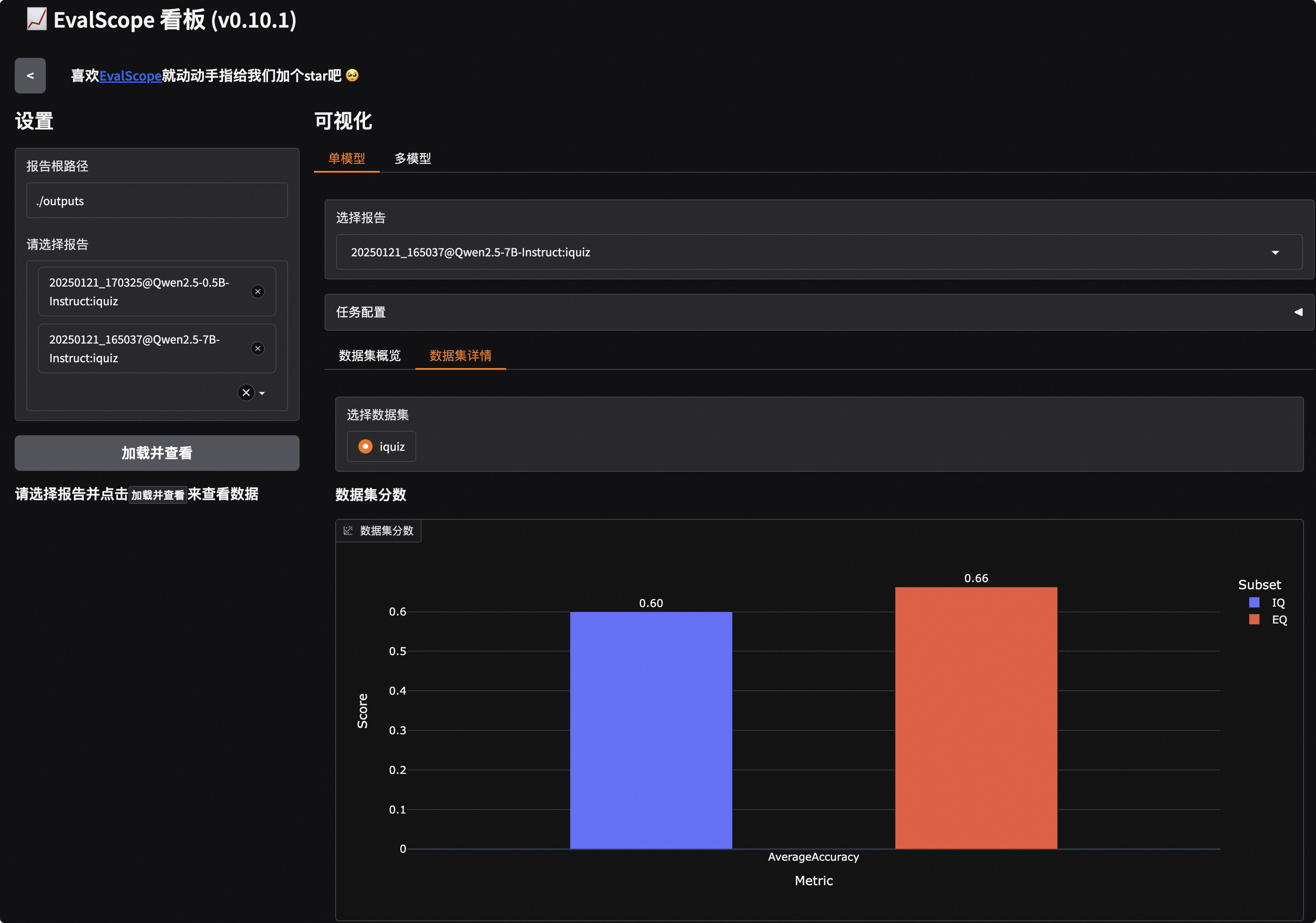
| Qwen2.5-7B-Instruct | iquiz | AverageAccuracy | IQ | 40 | 0.6 | default |
+---------------------+-----------+-----------------+----------+-------+---------+---------+
| Qwen2.5-7B-Instruct | iquiz | AverageAccuracy | EQ | 80 | 0.6625 | default |
+---------------------+-----------+-----------------+----------+-------+---------+---------+
```
From the preliminary evaluation results, it is clear that the 7B model significantly outperforms the 0.5B model in both IQ and EQ.
## Evaluating API Model Services
EvalScope also supports API evaluations. Below, we will evaluate the [Qwen2.5-72B-Instruct-GPTQ-Int4](https://modelscope.cn/models/Qwen/Qwen2.5-72B-Instruct-GPTQ-Int4) model using the API.
First, we need to start the Qwen2.5-72B-Instruct-GPTQ-Int4 model using vLLM and evaluate it via the API.
```bash
VLLM_USE_MODELSCOPE=True CUDA_VISIBLE_DEVICES=0 python -m vllm.entrypoints.openai.api_server --model Qwen/Qwen2.5-72B-Instruct-GPTQ-Int4 --gpu-memory-utilization 0.9 --served-model-name Qwen2.5-72B-Instruct --trust_remote_code --port 8801
```
Now, use EvalScope to evaluate via API:
```bash
evalscope eval \
--model Qwen2.5-72B-Instruct \
--api-url http://localhost:8801/v1 \
--api-key EMPTY \
--eval-type service \
--eval-batch-size 16 \
--datasets iquiz
```
Sample output evaluation report:
```text
+----------------------+-----------+-----------------+----------+-------+---------+---------+
| Model | Dataset | Metric | Subset | Num | Score | Cat.0 |
+======================+===========+=================+==========+=======+=========+=========+
| Qwen2.5-72B-Instruct | iquiz | AverageAccuracy | IQ | 40 | 0.825 | default |
+----------------------+-----------+-----------------+----------+-------+---------+---------+
| Qwen2.5-72B-Instruct | iquiz | AverageAccuracy | EQ | 80 | 0.8125 | default |
+----------------------+-----------+-----------------+----------+-------+---------+---------+
```
From the evaluation results, it is evident that the 72B model far surpasses both the 0.5B and 7B models in terms of IQ and EQ.
## Visualizing Model Evaluation Results
Now we will start the visualization interface of EvalScope to take a closer look at how the model answered each question.
```bash
evalscope app
```
Clicking the link will bring up the following visualization interface, where you first need to select the evaluation report and then click load:
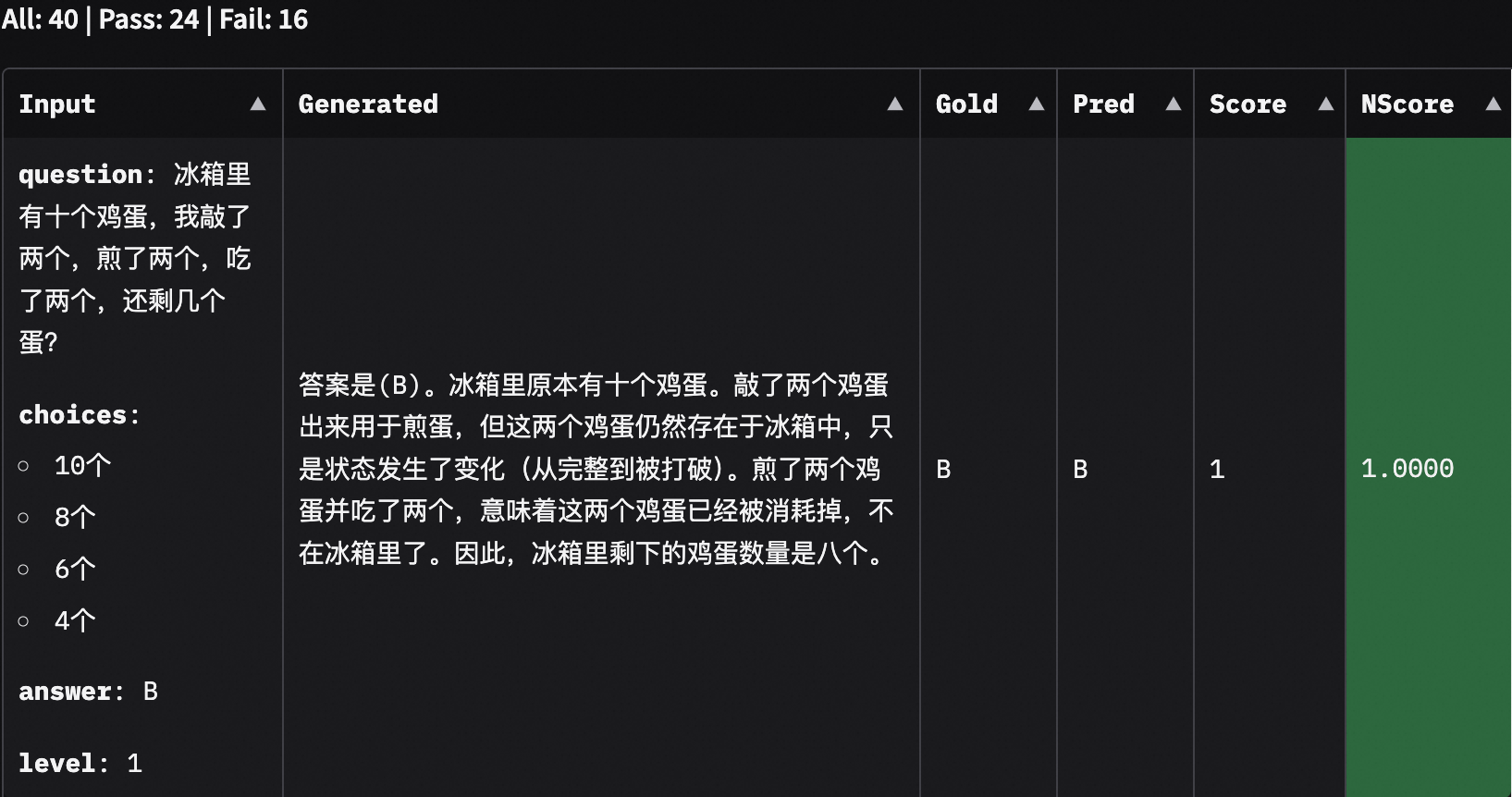
Additionally, by selecting the corresponding sub-dataset, we can also view the model's output content:
## Conclusion
From the model output results, it appears that the 0.5B model tends to directly output options without providing explanations as required, while the 7B model generally offers convincing explanations. Based on this evaluation, if you want AI to help you with your homework next time, remember to use a model with more parameters, or use the tools from this tutorial to evaluate it. If you are still eager for more, you can read EvalScope's [User Guide](https://evalscope.readthedocs.io/zh-cn/latest/get_started/basic_usage.html) to evaluate your own trained models using more datasets!