14 KiB
Text-to-Image Evaluation
The EvalScope framework supports the evaluation of various text-to-image models, including Stable Diffusion, Flux, and more. Users can evaluate these models using the EvalScope framework to obtain performance metrics across different tasks.
Supported Evaluation Datasets
Please refer to the documentation.
Supported Evaluation Metrics
The EvalScope framework supports a variety of evaluation metrics, allowing users to select suitable metrics based on their requirements. Below is the list of supported evaluation metrics:
| Evaluation Metric | Project Link | Scoring Range (Higher is Better) | Remarks |
|---|---|---|---|
VQAScore |
Github | [0, 1] (Typically) | Evaluates text-image consistency using Q&A |
CLIPScore |
Github | [0, 0.3] (Typically) | Uses CLIP to assess image-text matching |
BLIPv2Score |
Github | [0, 1] (Typically) | Evaluates image-text matching using BLIP's ITM |
PickScore |
Github | [0, 0.3] (Typically) | A scoring system based on the CLIP model that predicts user preference for generated images |
HPSv2Score/HPSv2.1Score |
Github | [0, 0.3] (Typically) | Evaluation metrics based on human preferences, trained on the Human Preference Dataset (HPD v2) |
ImageReward |
Github | [-3, 1] (Typically) | A reward model trained through human feedback, reflecting human preference for images |
MPS |
Github | [0, 15] (Typically) | Kuaishou: A multi-dimensional preference scoring method that comprehensively considers multiple attributes (e.g., realism, semantic alignment) of generated images to assess their quality |
FGA_BLIP2Score |
Github | Overall [0, 5] (Typically, each dimension is [0, 1]) | ByteDance: Used for evaluating the quality and semantic alignment of finely generated images |
Install Dependencies
Users can install the necessary dependencies using the following command:
pip install evalscope[aigc] -U
Benchmark
Users can configure text-to-image model evaluation tasks using the command below.
Here is an example code demonstrating the evaluation of the modelscope's Stable Diffusion XL model on tifa160 with default metrics:
from evalscope import TaskConfig, run_task
from evalscope.constants import ModelTask

task_cfg = TaskConfig(
    model='stabilityai/stable-diffusion-xl-base-1.0',  # model id on modelscope
    model_task=ModelTask.IMAGE_GENERATION,  # must be IMAGE_GENERATION
    model_args={
        'pipeline_cls': 'DiffusionPipeline',
        'use_safetensors': True,
        'variant': 'fp16',
        'torch_dtype': 'torch.float16',
    },
    datasets=[
        'tifa160',
        'genai_bench',
        'evalmuse',
        'hpdv2',
    ],
    limit=5,
    generation_config={
        'height': 1024,
        'width': 1024,
        'num_inference_steps': 50,
        'guidance_scale': 9.0,
    }
)

# Run the evaluation task
run_task(task_cfg=task_cfg)
Parameter Description
For basic parameters, please refer to: Parameter Description.
Important parameters to note:
model: Model ID, supports local models and modelscope model id.model_task: Model task type, must beimage_generation.model_args: Model loading parameters, supports passing in model loading parameters including:pipeline_cls:Pipelineclass fromdiffusersused to load the model, default isDiffusionPipeline. The remaining parameters are parameters of thisPipeline. Please refer to diffusers documentation.use_safetensors: Whether to use safe tensors.variant: Model variant.
generation_config: Generation parameters, supports passing in model generation parameters. Refer to the correspondingPipelineclass for parameters generally including:height: Height of the generated image.width: Width of the generated image.num_inference_steps: Inference steps for generating images.guidance_scale: Guidance scale for generating images.
Output Results
Upon completion of the evaluation, EvalScope will output the evaluation results, including model ID, dataset, metric, subset, quantity, and score. Below is an example of the output result:
+------------------------------+-------------+------------------------------+------------------+-------+---------+---------+
| Model                        | Dataset     | Metric                       | Subset           |   Num |   Score | Cat.0   |
+==============================+=============+==============================+==================+=======+=========+=========+
| stable-diffusion-xl-base-1.0 | evalmuse    | FGA_BLIP2Score:overall_score | EvalMuse         |     5 |  3.3148 | default |
+------------------------------+-------------+------------------------------+------------------+-------+---------+---------+
| stable-diffusion-xl-base-1.0 | evalmuse    | FGA_BLIP2Score:activity      | EvalMuse         |     2 |  0.4592 | default |
+------------------------------+-------------+------------------------------+------------------+-------+---------+---------+
| stable-diffusion-xl-base-1.0 | evalmuse    | FGA_BLIP2Score:attribute     | EvalMuse         |    11 |  0.8411 | default |
+------------------------------+-------------+------------------------------+------------------+-------+---------+---------+
| stable-diffusion-xl-base-1.0 | evalmuse    | FGA_BLIP2Score:location      | EvalMuse         |     2 |  0.8763 | default |
+------------------------------+-------------+------------------------------+------------------+-------+---------+---------+
| stable-diffusion-xl-base-1.0 | evalmuse    | FGA_BLIP2Score:object        | EvalMuse         |    14 |  0.705  | default |
+------------------------------+-------------+------------------------------+------------------+-------+---------+---------+
| stable-diffusion-xl-base-1.0 | evalmuse    | FGA_BLIP2Score:material      | EvalMuse         |     4 |  0.7717 | default |
+------------------------------+-------------+------------------------------+------------------+-------+---------+---------+
| stable-diffusion-xl-base-1.0 | evalmuse    | FGA_BLIP2Score:food          | EvalMuse         |     1 |  0.611  | default |
+------------------------------+-------------+------------------------------+------------------+-------+---------+---------+
| stable-diffusion-xl-base-1.0 | evalmuse    | FGA_BLIP2Score:color         | EvalMuse         |     1 |  0.784  | default |
+------------------------------+-------------+------------------------------+------------------+-------+---------+---------+
| stable-diffusion-xl-base-1.0 | evalmuse    | FGA_BLIP2Score:human         | EvalMuse         |     2 |  0.2692 | default |
+------------------------------+-------------+------------------------------+------------------+-------+---------+---------+
| stable-diffusion-xl-base-1.0 | evalmuse    | FGA_BLIP2Score:spatial       | EvalMuse         |     1 |  0.1345 | default |
+------------------------------+-------------+------------------------------+------------------+-------+---------+---------+
| stable-diffusion-xl-base-1.0 | genai_bench | VQAScore                     | GenAI-Bench-1600 |     5 |  0.9169 | default |
+------------------------------+-------------+------------------------------+------------------+-------+---------+---------+
| stable-diffusion-xl-base-1.0 | genai_bench | VQAScore_basic               | GenAI-Bench-1600 |     5 |  0.9169 | default |
+------------------------------+-------------+------------------------------+------------------+-------+---------+---------+
| stable-diffusion-xl-base-1.0 | hpdv2       | HPSv2.1Score                 | HPDv2            |     5 |  0.3268 | default |
+------------------------------+-------------+------------------------------+------------------+-------+---------+---------+
| stable-diffusion-xl-base-1.0 | hpdv2       | HPSv2.1Score_Animation       | HPDv2            |     5 |  0.3268 | default |
+------------------------------+-------------+------------------------------+------------------+-------+---------+---------+
| stable-diffusion-xl-base-1.0 | tifa160     | PickScore                    | TIFA-160         |     5 |  0.2261 | default |
+------------------------------+-------------+------------------------------+------------------+-------+---------+---------+
Custom Evaluation
Users can configure custom prompts to evaluate tasks using the command below.
Custom Dataset Evaluation
Provide a JSONL file in the following format:
{"id": 1, "prompt": "A beautiful sunset over the mountains", "image_path": "/path/to/generated/image1.jpg"}
{"id": 2, "prompt": "A futuristic city skyline", "image_path": "/path/to/generated/image2.jpg"}
id: Unique identifier for the evaluation data.prompt: Prompt text for generating the image.image_path: Path to the generated image.
Configure Evaluation Task
Below is example code using a custom evaluation dataset, showcasing the use of all metrics:
- For custom evaluation tasks, you do not need to provide the `model` parameter, `model_id` is used to specify the model name. Simply configure the `image_path` of the corresponding model generation.
- All metrics models are loaded upon task initialization, which may result in large memory usage. It is recommended to adjust the metrics or divide the calculations into multiple tasks as needed.
Run the following code:
from evalscope import TaskConfig, run_task

task_cfg = TaskConfig(
    model_id='T2I-Model',
    datasets=[
        'general_t2i'
    ],
    dataset_args={
        'general_t2i': {
            'metric_list': [
                'PickScore',
                'CLIPScore',
                'HPSv2Score',
                'BLIPv2Score',
                'ImageRewardScore',
                'VQAScore',
                'FGA_BLIP2Score',
                'MPS',
                ],
            'dataset_id': 'custom_eval/multimodal/t2i/example.jsonl',
        }
    }
)

run_task(task_cfg=task_cfg)
Output Results
Output results are as follows:
+-------------+-------------+------------------+----------+-------+---------+---------+
| Model       | Dataset     | Metric           | Subset   |   Num |   Score | Cat.0   |
+=============+=============+==================+==========+=======+=========+=========+
| dummy-model | general_t2i | PickScore        | example  |    10 |  0.2071 | default |
+-------------+-------------+------------------+----------+-------+---------+---------+
| dummy-model | general_t2i | CLIPScore        | example  |    10 |  0.1996 | default |
+-------------+-------------+------------------+----------+-------+---------+---------+
| dummy-model | general_t2i | HPSv2Score       | example  |    10 |  0.2626 | default |
+-------------+-------------+------------------+----------+-------+---------+---------+
| dummy-model | general_t2i | HPSv2.1Score     | example  |    10 |  0.238  | default |
+-------------+-------------+------------------+----------+-------+---------+---------+
| dummy-model | general_t2i | BLIPv2Score      | example  |    10 |  0.2374 | default |
+-------------+-------------+------------------+----------+-------+---------+---------+
| dummy-model | general_t2i | ImageRewardScore | example  |    10 | -0.238  | default |
+-------------+-------------+------------------+----------+-------+---------+---------+
| dummy-model | general_t2i | VQAScore         | example  |    10 |  0.6072 | default |
+-------------+-------------+------------------+----------+-------+---------+---------+
| dummy-model | general_t2i | FGA_BLIP2Score   | example  |    10 |  2.6918 | default |
+-------------+-------------+------------------+----------+-------+---------+---------+
| dummy-model | general_t2i | MPS              | example  |    10 |  4.8749 | default |
+-------------+-------------+------------------+----------+-------+---------+---------+
Custom Benchmark Evaluation
To use a custom model for benchmark evaluation, download the corresponding benchmark JSONL file from modelscope, e.g., eval_muse_format.jsonl, and replace the model-generated image paths with the corresponding image_path, as shown below:
{"id":"EvalMuse_1","prompt":"cartoon die cut sticker of hotdog with white border on gray background","tags":["cartoon (attribute)","die cut sticker (object)","hotdog (food)","white (object)","border (object)","gray (color)","background (attribute)"], "image_path":"/path/to/generated/image1.jpg"}
{"id":"EvalMuse_2","prompt":"Fiat 124","tags":["Fiat 124 (object)"], "image_path":"/path/to/generated/image2.jpg"}
Configure Evaluation Task
Configure the corresponding evaluation task, and run the following code:
from evalscope import TaskConfig, run_task

task_cfg = TaskConfig(
    model_id='T2I-Model',
    datasets=[
        'evalmuse',
    ],
    dataset_args={
        'evalmuse': {
            'dataset_id': 'custom_eval/multimodal/t2i/example.jsonl',
        }
    }
)

run_task(task_cfg=task_cfg)
Visualization
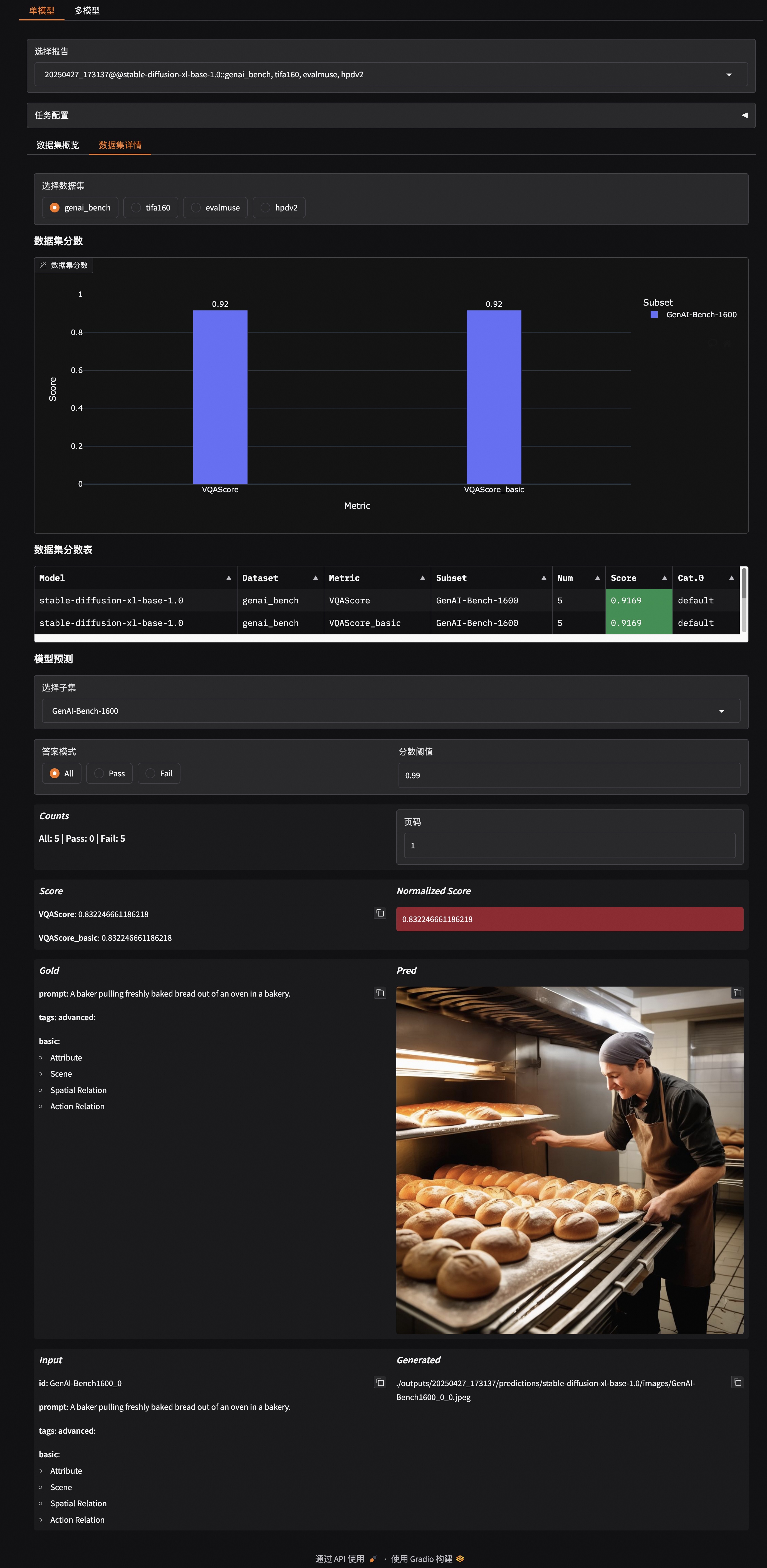
The EvalScope framework supports visualization of evaluation results. Users can generate a visual report using the following command:
evalscope app
For usage documentation, please refer to the visualization documentation.
An example is shown below: